Age Calculator
This age calculator helps you calculate exact age in years, months, and days using a date of birth. It also finds the time difference between two dates and shows results in weeks, days, hours, minutes, and seconds, making age calculation simple and accurate.
This age calculator helps you calculate your exact age in years, months, and days using your date of birth. You can also use this tool to find the time between two different dates. It's useful for checking your current age, your age on a future date, or the time remaining until an important event like a birthday or anniversary.
For convenience, the calculator provides results in multiple time units. In addition to age in years, months, and days, it also shows your age in total months, weeks, days, hours, minutes, and seconds. This makes it easy to answer questions like "How many weeks have I been alive?" or "How many days old am I?"
The latest version of this age calculator also includes an advanced feature that allows you to calculate a possible date of birth based on age. If you only know your age in years, or years and months, the calculator can estimate the range of dates in which a person might have been born. To use this option, scroll to the settings section, select "Age," and save your preference. The calculator will then display age input fields instead of date fields.
What is my age?
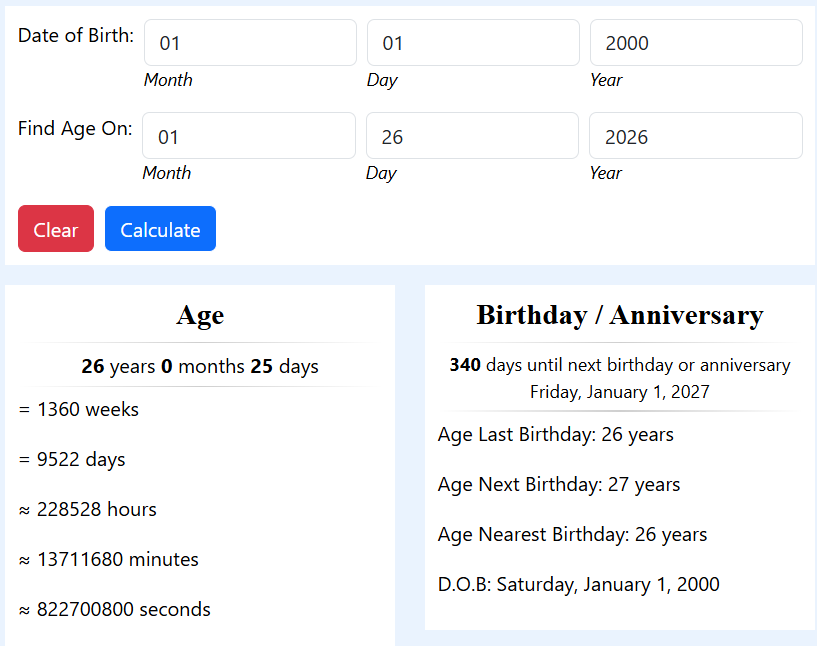
This chronological age calculator helps you find your exact age today or on any chosen date. To see your current age, simply enter your date of birth and today's date. If you want to know how old you will be on a future date, you can enter that date in the "Find age on date" field.
Below the results, the calculator also shows how many days are left until your next birthday or anniversary.
This makes it easy to track upcoming milestones and special events.How to Calculate Age
To calculate your age using this calculator, first enter your date of birth in the "Date of Birth" section. You will need to provide the month, day, and year. Next, enter the date on which you want to calculate your age in the "Calculate Age on This Date" field. By default, this field is set to today's date, but you can change it to any past or future date.
After entering both dates, click the "Calculate" button. The calculator will instantly display your exact age in years, months, and days. Additionally, you will see your total age in weeks, days, hours, minutes, and seconds.
How Old is My Baby?
Parents of newborns or young children often need to calculate age in weeks or months rather than years. This age calculator automatically provides age in weeks and months, making it ideal for tracking a child's growth.
To find out how many weeks old your newborn is, simply enter your baby's date of birth and click the "Calculate" button. The "Calculate Age on This Date" field will automatically populate with today's date, but you can choose a future date if needed. The calculator will then display your child's age in weeks, months, and days.
How Age is Calculated
This age calculator uses two different methods to calculate age. The first method calculates age in years, months, and days, as well as in months and days. The second method accurately calculates the age in total days and then converts that value into weeks, hours, minutes, and seconds.
In the first method, the calculator assumes each year has 365 days and each month has an average of 30.4167 days. This average is calculated by dividing 365 days by 12 months. Using this method, the calculator can express the age in standard years and months.
For example, when someone says they are 15 years old, they typically don't account for leap years separately. This calculator follows the same logic and treats all years equally when calculating age in years and months.
However, when calculating the total number of days, the calculator uses a precise programming function. This function takes into account leap years and the exact number of days between the two dates. The result is an accurate total number of days that reflects the actual calendar difference.
Age Calculation Step by Step
To calculate the age or the difference between two dates, the calculator follows a method similar to long subtraction. The dates are arranged in YYYY-MM-DD format, with the older date placed below the newer date.
First, the calculator subtracts the days. If the day value is negative, it borrows one month and adds the number of days in the previous month. Next, it subtracts the months. If necessary, it borrows one year and adds twelve months. Finally, it subtracts the years.
The final result is displayed in years, months, and days. This method ensures accuracy when working with actual calendar dates.
How many days are left until an event?
You can also use this age calculator to find out how many days are left until a specific date or event. This is helpful for counting down to birthdays, anniversaries, holidays, vacations, or other important occasions.
To do this, enter today's date in the "Date of Birth" field and your target date in the "Calculate Age on This Date" field. The calculator will display the exact number of days remaining until that event.
Guidelines for entering dates
The calculator allows you to enter single-digit days and months. If the value is less than 10, you don't need to add a leading zero. However, the year must always be entered as a four-digit number.
The calculator considers the start date as day zero. This means that the count begins after one full day has passed. For example, if you enter March 15th and March 18th, the result will be three days. The 15th is considered day zero, and the count starts from the 16th.
Using Excel to calculate age
You can also calculate age or the difference between dates using Microsoft Excel. To calculate age in years, enter your date of birth in MM/DD/YYYY format in a cell. Then use the formula =DATEDIF(A1, TODAY(), "Y"). To calculate the months and days, you can use these formulas: For months: =DATEDIF(A1, TODAY(), "YM") and For days: =DATEDIF(A1, TODAY(), "MD"). These results can be combined using the CONCAT function to display the age in a readable format.
